






Wizardo Casino App and Mobile PWA
 The Wizardo Casino App does not necessarily require downloading a classic application from an app store. With our Progressive Web App, you can add Wizardo casino to the home screen of your smartphone or tablet and access the services available in your profile more quickly.
This mode lets you open Wizardo casino with fewer steps than a traditional browser, while keeping access to the lobby, Wallet, PROMO, Missions, and support. Before playing from mobile, always use the official site, check your account status, and verify the conditions for active bonuses, payments, and games.
What Type of App Wizardo Casino Uses
Wizardo Casino uses a mobile solution based on a Progressive Web App. Open the site from your browser, add the icon to your Home screen, and then access our services more directly.
The PWA is not the same as a native app downloaded from the App Store or Google Play. The experience may feel similar when accessing the site, but it remains connected to the browser, device, connection, and the features available in your country and profile.
No APK, No Google Play, No App Store
At the moment, the mobile access described on this page refers to the PWA. You do not need to download APK files, install apps from unverified marketplaces, or use copies of the site published on external channels.
For security reasons, avoid APK files, mirrors, links received via chat, apps with a similar logo, or pages that ask for credentials outside the official site. If you have doubts about a link or file, do not enter your password or payment details and contact our support at [email protected].
Installation on Android
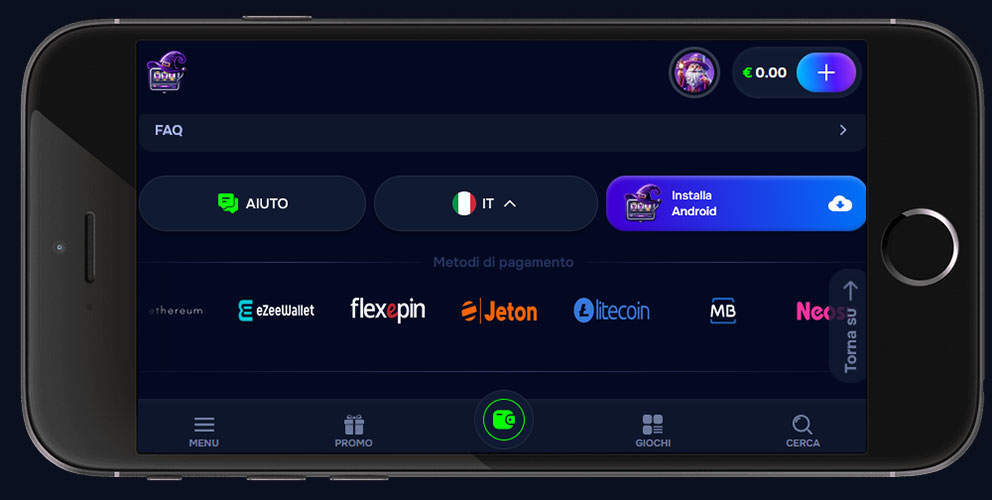 On Android, you install the PWA from the browser. Chrome is usually the most convenient option, but availability may vary depending on the browser and operating system version.
- Open Chrome or a compatible browser on your smartphone or tablet.
- Visit the official Wizardo Casino site.
- Open the browser menu, usually shown with three dots.
- Select Add to Home Screen or Install app, if the option is available.
- Confirm the icon name and complete the addition.
- Open Wizardo Casino from the new icon on your home screen.
If the option does not appear, update the browser, reload the site, or try using Chrome. Alternatively, you can continue using the mobile site directly from the browser.
Installation on iPhone and iPad
On iPhone and iPad, you add the PWA through Safari’s sharing function. We recommend using Safari, because some browsers on iOS may not show the same options.
- Open Safari on your iPhone or iPad.
- Go to the official Wizardo Casino site.
- Tap the Share icon.
- Select Add to Home Screen.
- Check the icon name and confirm.
After adding it, the icon opens the site in a more direct mode, similar to an app. The available features remain those enabled by our services, the browser, the device, and your account status.
PWA or Browser: What Really Changes
The PWA and the mobile browser lead to the same Wizardo services, but the way you access the site changes. The PWA is useful if you want to reduce the number of opening steps, while the browser remains convenient if you prefer not to add icons to your home screen.
| Option | How it works | When it can be useful |
|---|---|---|
| Mobile browser | You open the site by typing the address or using a bookmark. | If you do not want to install anything or use different devices. |
| PWA | You add the site to the Home screen and open it from an icon. | If you often use the same device and want more direct access. |
In both cases, you use the same account, the same Wallet, and the same sections available in your profile. The access method changes, not the rules for verification, payments, bonuses, or responsible gaming.
Features Available on Mobile
From mobile, you can use the main Wizardo features if they are available in your account. Access may include the game lobby, profile, Wallet, Deposit, Withdraw, PROMO, Missions, and support.
Slots and other games can be opened from a smartphone or tablet, but availability, loading, and performance depend on the provider, connection, device, and browser. For a dedicated overview of games, you can visit the page about our online slot machines.
Before playing with real balance from mobile, always check the selected bet, the balance being used, the active bonus, and the connection status. On small screens, it is easier to tap buttons by mistake, so check the amount before starting the game.
Bonuses and Missions from PWA
Promotions and missions may also be accessible from the PWA when available in your profile. This does not change the offer conditions: wagering, minimum deposit, duration, maximum bet, eligible games, and limits remain those shown in the PROMO section or on the promotion page.
To learn more about offers without overloading this mobile guide, visit the Wizardo casino bonus page. From the PWA, we still recommend reading the conditions before activation, because bonuses and Free Spins do not guarantee winnings and may have specific restrictions.
Benefits and Limits of the PWA
The PWA can make access easier, but it does not remove the checks required by our services and does not replace the site rules. It is an access mode, not a separate product.
| Aspect | What to know |
|---|---|
| Access | The icon on the Home screen reduces the steps compared with manually opening the browser. |
| Download | It does not require APK files or downloads from unverified stores. |
| Updates | The services update through the site, but behavior may depend on cache and browser. |
| Performance | Loading and smoothness depend on the device, browser, connection, and game opened. |
| Limits | Some features may vary depending on account, country, provider, or device settings. |
Mobile Security and Official Site
Use the PWA only after opening the official site from your browser. Do not enter credentials on pages that imitate Wizardo Casino, do not download APK files from external sources, and do not follow links received from social profiles or unverified messages.
To protect your account, use a screen lock, secure password, updated browser, and reliable connection. If the device is shared with other people, log out of your account after the session and do not save credentials or payment details.
Common Problems and Solutions
I do not see “Add to Home Screen”
On Android, try using an updated version of Chrome or check the browser menu. On iPhone, use Safari, because the option may not appear in the same way on other browsers.
The icon does not open correctly
Remove the icon and add it again from the official site. It may also help to update the browser, clear the cache, or restart the device.
A game does not load on mobile
Check the connection, reload the page, and try closing and reopening the PWA. If the issue continues, try from the mobile browser and report the game name, device, browser, and time to our support.
The PWA opens the browser
This behavior may depend on the operating system, browser, or device settings. Even if it opens in the browser, you can continue using the mobile site with the same account.
Login or Wallet is not working
Check that you are on the official site, verify your email and password, disable interfering extensions, and try clearing cache and cookies. For payment or withdrawal issues, KYC checks or payment method verification may be required.
Responsible Gaming on Mobile
Fast access from a smartphone can make it easier to start a session without planning it. Before playing, decide your budget and session length, avoid chasing losses, and check whether you are using real balance or bonus balance.
If you want to reduce, suspend, or stop gaming, visit the responsible gaming page or contact our support. Available options may depend on the profile and applicable jurisdiction.
Frequently Asked Questions
Where can I download the Wizardo casino app?
You do not need to download a classic app from a store. You can use the PWA by adding the official site to the Home screen through your device’s compatible browser.
Is the app available for iPhone?
On iPhone and iPad, you can add Wizardo Casino to the Home screen through Safari. The option to use is Add to Home Screen in the Share menu.
Can I install Wizardo Casino on Android?
Yes, on Android you can add the PWA from the browser screen when the option is available. Chrome or another browser compatible with Add to Home Screen or Install app is usually used.
Do I need to download an APK?
No. To use Wizardo Casino from mobile, you do not need to download APK files from external sites or unverified sources. The safest access is through the official site and the browser’s PWA function.
Can I use bonuses and missions from the PWA?
Yes, the PROMO and Missions sections may also be available from the PWA, according to the active features in your profile. Bonus conditions remain the same as in the browser version, including wagering, duration, eligible games, and limits.
Does the PWA offer live games?
The PWA may provide access to live games available in the lobby, if supported by the device, browser, and provider. The quality of the experience also depends on the connection and service status.
What should I do if the PWA does not work?
Try updating the browser, removing and reinstalling the icon, checking the connection, or opening the site from the mobile browser. If the issue concerns login, Wallet, or a specific game, contact our support with device, browser, and screenshots if available.
Is Wizardo Casino PWA safe?
Security depends on using the official site, our technical measures, and user behavior. Avoid APK files, mirrors, and unverified links, protect your credentials and device, and do not share sensitive data with third parties.
Payment methods